
Table of Contents

HouseCanary
Know what any property is really worth.
AVMs with a 2.7% median error, plus the comps and forecasts agents and investors rely on.
Explore PlansOverview
You need a property's value, its market rent, and where both are heading, inside your own application, on demand. This guide covers how to do that against a REST API: how authentication works, how endpoints are structured, what the JSON comes back looking like, how to batch thousands of properties in one request, and how rate limits and errors behave. Every request and response below is real output from the HouseCanary Data Explorer API, run against the same address, so you can see exactly what you'd get. The last section covers what this data does not do — which matters more when you're building on it than when you're evaluating it.
Key Takeaways
- HouseCanary's Data Explorer API is a REST API that returns JSON property data — valuations, rental estimates, and 36-month forecasts — for 136 million U.S. residential properties, authenticated with an API key and secret over HTTPS at
https://api.housecanary.com. - Every endpoint follows the same
{LEVEL}/{TARGET}shape —property/value,property/rental_value,zip/hpi_forecast— across 75+ data points at property, block, block group, ZIP, MSA, and state level. - The valuation model carries a 2.7% median absolute error on post-close valuations (7.5% pre-close), and every value and rent response includes a confidence interval and a forecast standard deviation, so your code can branch on model confidence.
- GET returns one property; POST batches many in a single call. Rate-limited (
429) and no-data (204) responses are not billed.
What is a real estate data API?
A real estate data API is a web service that returns structured property data — valuations, rents, ownership, transaction history, risk, market indices — to your application over HTTP, so you can query a property the way you'd query your own database instead of scraping listings or importing spreadsheets.
In practice that means REST over HTTPS, JSON responses, and an API key you attach to each request. You send an address; you get back a structured object your code can read directly. The difference between one of these APIs and a data export is currency and coverage: the API answers for any property in the covered footprint, at the moment you ask, without you maintaining a copy of the data.
The typical integrations are underwriting and pre-qualification flows, investment and deal-screening tools, portfolio monitoring, CRM enrichment, and consumer-facing property apps. In each case the API is doing the same job — turning an address into a set of numbers your application can act on.
What is the best real estate data API for developers?
HouseCanary's Data Explorer API is a REST API built for developers: JSON responses, API-key-and-secret authentication over HTTPS, a consistent {LEVEL}/{TARGET} endpoint structure across 75+ data points, POST batching for bulk workloads, separate test credentials for staging, and published error semantics including rate-limit headers. It covers 136 million U.S. residential properties, returns valuations with a 2.7% median absolute error post-close, and forecasts property values month-by-month up to 36 months ahead. Full documentation is at api-docs.housecanary.com, with a Postman collection and code samples in 20 languages on the developer tools page.
If you're evaluating property-data APIs generally, the criteria that actually predict integration pain are worth checking in this order:
- Coverage — how many properties, and does it hold up in the 12 non-disclosure states where sale prices aren't public record?
- Published accuracy — is there a stated median error against actual transactions, or only adjectives?
- Confidence signals — does each valuation report its own expected error, so your code can branch on it?
- Forecast horizon — historical only, or forward-looking, and how far?
- Batching — can you send 5,000 addresses in one request, or are you writing a rate-limit-aware queue?
- Error and billing semantics — are failed and empty responses billed?
- Refresh cadence — daily, monthly, on demand?
- Licensing — what are you allowed to display, cache, and redistribute?
For a wider survey of what's available in the category before you narrow on those criteria, see our roundup of the best real estate APIs.
How do you authenticate and make your first API request?
Authentication is HTTP Basic over HTTPS. You generate an API Key and API Secret in the Developer Center at solutions.housecanary.com, then send the key as the username and the secret as the password on every request. The secret is displayed once and cannot be retrieved afterward, so store it at creation time. HTTPS is required; plain HTTP requests are rejected.
Each user can hold up to three API keys and three test API keys at a time. Test keys let you verify integration behavior against a set of test addresses in a development or staging environment before you point at production. Usage limits are set at the organization level, not per key, so you can split keys per service or per environment without splitting your quota.
The base URL is https://api.housecanary.com. Endpoints are versioned individually: everything in this guide is on v2 and follows the form /v2/{LEVEL}/{TARGET} (a few newer endpoints, such as value by image, are on v3) — where {LEVEL} is the geographic grain (property, block, blockgroup, zip, msa, state) and {TARGET} is the data point (value, rental_value, details). So property/value is the AVM for a single property.
Your first call, with credentials in environment variables:
curl -G https://api.housecanary.com/v2/property/value \
  -d address="7904 Verde Springs Dr" \
  -d zipcode="89128" \
  -u "$HC_API_KEY:$HC_API_SECRET"
The same request in Python:
import os, requests

resp = requests.get(
    "https://api.housecanary.com/v2/property/value",
    params={"address": "7904 Verde Springs Dr", "zipcode": "89128"},
    auth=(os.environ["HC_API_KEY"], os.environ["HC_API_SECRET"]),
)
resp.raise_for_status()
print(resp.json())
For the click-by-click credential walkthrough, see the Data Explorer API quick start guide.
What endpoints does the API expose?
Because every endpoint shares the {LEVEL}/{TARGET} form, learning one teaches you the rest — swap the target to change the data point, swap the level to change the geographic grain. The 75+ data points group into six families:
- Valuation —
property/value(the AVM),property/value_analysis(comps, data density, and a recommended next step),property/value_within_block,property/value_by_condition(values at six condition levels),property/land_value,property/ltv_details. - Forecasting —
property/value_forecast(36 months ahead),property/value_hpi_adjusted(adjust a BPO or appraisal to a past or future date), plus block and block-group value time series, forward and historical. - Rental analysis —
property/rental_value,property/rental_value_forecast,property/rental_value_distribution, gross rental yield, and Rental Price Index endpoints at ZIP, MSA, and state level. - Market analysis —
zip/detailsandmsa/details(CAGR over 1, 5, 10, and 20 years, max historical 12-month HPI loss, supply-and-demand scoring),zip/market_grade,zip/volatility, affordability time series. - Transaction and ownership history —
property/sales_history,property/tax_history,property/mortgage_lien,property/mortgage_lien_all,property/owner_occupied,property/nod. - Risk — flood, earthquake, hail, hurricane, tornado, wind, crime, FEMA disaster areas, Superfund sites, and school data, most of it at block level.
Property characteristics and geocoding sit alongside these: property/details, property/details_enhanced, property/geocode, and property/geo_features. Several data points are premium tier and priced separately — the Data Explorer product page marks which, and the full endpoint reference has request and response examples for each.
How do I get rental estimates via API?
Call property/rental_value with an address. The response returns HouseCanary's automated rental valuation — a monthly market rent estimate from a model ensemble, refreshed monthly — with an upper bound, a lower bound, and a forecast standard deviation (fsd) reporting how confident the model is.
curl -G https://api.housecanary.com/v2/property/rental_value \
  -d address="7904 Verde Springs Dr" \
  -d city="Las Vegas" -d state="NV" -d zipcode="89128" \
  -u "$HC_API_KEY:$HC_API_SECRET"
[{
"property/rental_value": {
"api_code": 0,
"api_code_description": "ok",
"result": {
"price_mean": 1966,
"price_lwr": 1749,
"price_upr": 2184,
"fsd": 0.1106
}
},
"address_info": {
"address_full": "7904 Verde Springs Dr Las Vegas NV 89128",
"zipcode": "89128", "state": "NV", "msa": "29820",
"block_id": "320030032194007",
"lat": 36.19194, "lng": -115.26735,
"geo_precision": "rooftop"
}
}]Market rent is $1,966/month, with a range of $1,749–$2,184. The fsd of 0.1106 is the useful field for anything automated: it's the model's own expected error, about 11%, and the bounds are derived from it (price_upr = price_mean × (1 + fsd)). Branch on it. A tight fsd means you can price or underwrite off the estimate directly; a wide one means the property is unusual for its block and deserves a human look before it drives a decision.
{
  "property/rental_value": {
    "api_code": 0,                 // 0 = data returned; 204 = no data for this address
    "result": {
      "price_mean": 1966,       // market rent, $/month
      "price_lwr": 1749,        // lower bound = price_mean × (1 − fsd)
      "price_upr": 2184,        // upper bound = price_mean × (1 + fsd)
      "fsd": 0.1106             // forecast standard deviation: the model's own expected error (~11%)
    }
  }
}
How far ahead does the rental forecast go?
property/rental_value_forecast returns forecast rent at 3, 6, and 12 months — not 36. The 36-month horizon applies to property values, not rents. Same address:
[{
  "property/rental_value_forecast": {
    "api_code": 0,
    "result": {
      "month_03": { "value": 1987 },
      "month_06": { "value": 2008 },
      "month_12": { "value": 2046 }
    }
  }
}]
Rent on this property is forecast to move from $1,966 to $2,046 over twelve months — +4.1%. For rent trends above the property level, the Rental Price Index endpoints return forecast and historical RPI time series at ZIP, MSA, and state level, along with 12-month RPI appreciation, the historical maximum 12-month RPI loss, and the modeled risk that a market's RPI is lower in a year.
Combining value and rent into a yield
The reason to call both endpoints in one pass is that gross rental yield falls straight out of them. property/value on the same address returns a price_mean of $405,508 (range $372,673–$438,343, fsd 0.0810). Against $1,966/month:
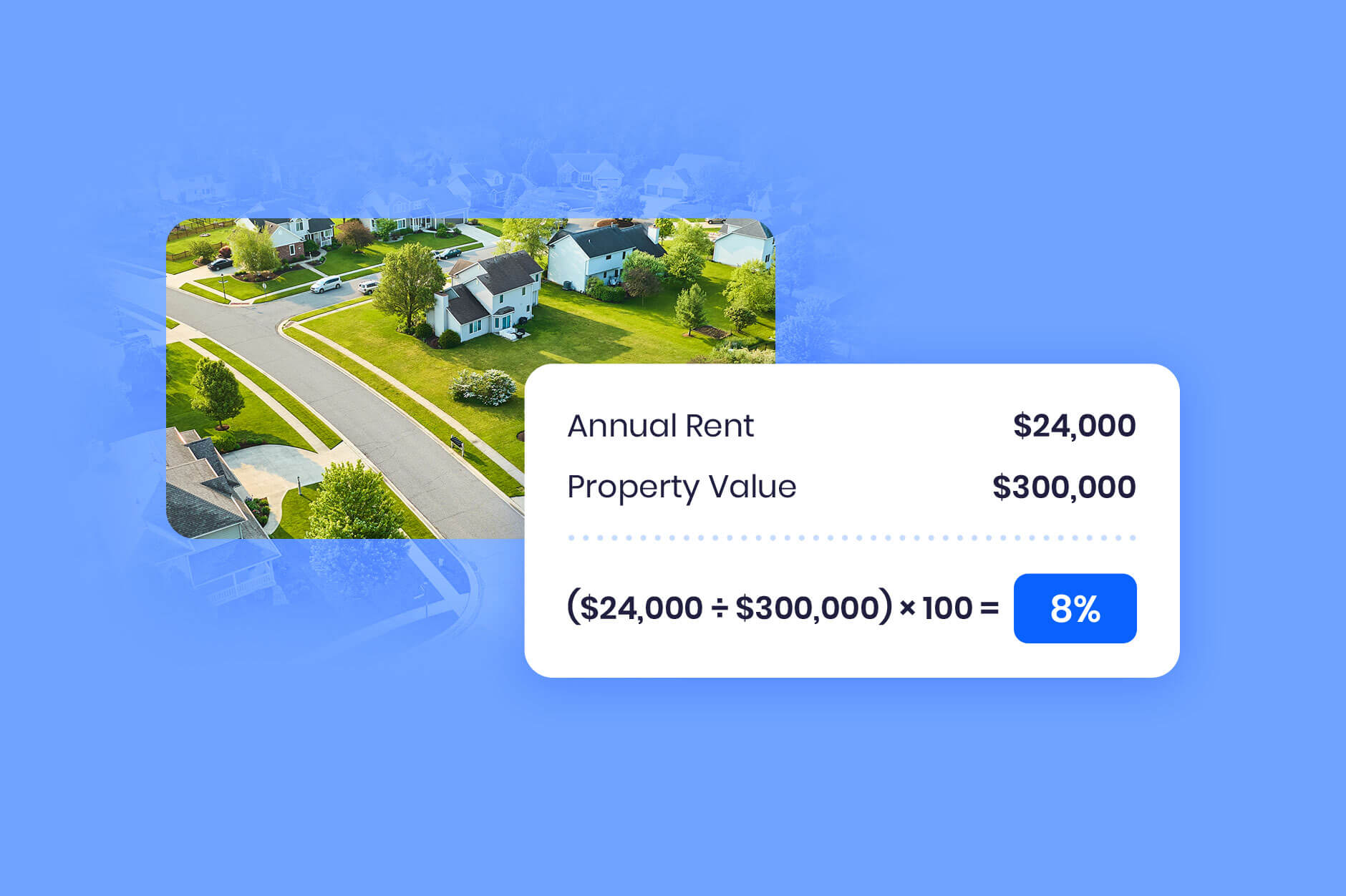
Gross rental yield = (annual rent ÷ property value) × 100
                   = ($1,966 × 12) ÷ $405,508 × 100
                   = 5.82%
That's inside the 5–8% range generally treated as healthy for single-family rentals. If you'd rather not compute it, the API exposes gross rental yield directly at block through state level. For the net-of-expenses version, see cap rate.
How do I get property valuations and forecasts via API?
property/value returns HouseCanary's AVM: a current market value estimate, upper and lower bounds, and an fsd. The model carries a 2.7% median absolute error on post-close valuations and 7.5% pre-close, measured against actual transactions across 136 million properties, and it refreshes monthly. On the sample address it returns $405,508 with an fsd of 0.0810 — roughly ±8%, a tight band that reflects a typical home on a well-documented block.
Two companion endpoints do most of the work in production systems. property/value_analysis returns the context behind the number — preliminary data density checks, details on comps and neighborhood norms, the value and its confidence level, and a recommended next step in the valuation process — which is what you want when the AVM is one input to a decision rather than the decision. property/value_forecast projects the same property's value month-by-month up to 36 months ahead.
For how the model works and where automated valuations outperform manual ones, see automated valuation model.
How do you batch requests and handle rate limits and errors?
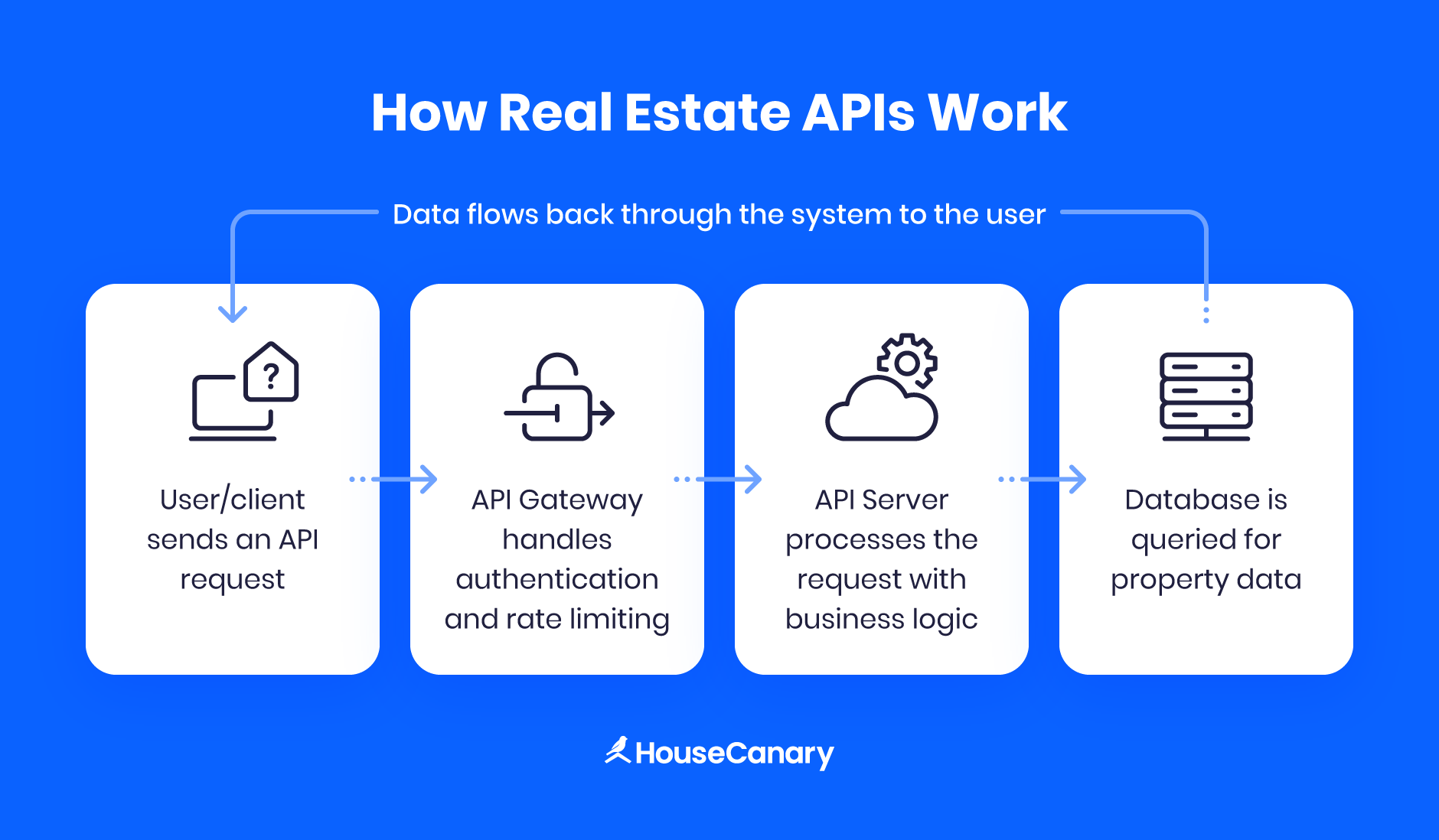
Use POST for batching. A GET returns one item; a POST accepts a sequence of item identifiers in the request body and returns a JSON array of chunks — one per requested item, in request order — so you can pull thousands of properties in a single call instead of building a queue. Responses are always JSON arrays, which means the same parsing code handles one property or ten thousand.
Errors come in two layers, and both need handling:
- HTTP status —
200on a normal response.400for missing required fields or a malformed request, with an explanation in the body.401for an authentication failure, returned without explanation.429when your organization hits its rate limit; wait until the UTC epoch time in theX-RateLimit-Resetheader before retrying. - Per-section
api_code— inside a200, each requested section carries its ownapi_codeandapi_code_description.0means the data came back.204means we have no data for that item — a real answer, not a failure, and worth surfacing distinctly in your code rather than treating as an error.
Neither 429 nor 204 responses are billed, and neither are requests that fail with the HTTP status codes above — so a retry loop that trips a rate limit doesn't cost you, and querying an address we don't cover doesn't either. Rate limits are contractual and set per organization rather than published as a single figure. Your current limits are shown in the Analytics API section of the Developer Center, and the API documentation covers the headers and retry behavior in detail.
Server status is published at HouseCanary's status page, with SMS, email, and RSS subscriptions.
How do you get API access, and what does it cost?
Create an account, open the Developer Center, and generate a test API key first — it exercises the full request and response path using non-billable test addresses before you commit to production integration. Current plans and what each tier includes are listed in the Developer Center, including which data points sit behind the premium tier: several valuation, forecasting, and rental analytics endpoints are priced separately from the standard set.
There are two other ways into the same data, depending on what you're building. For volumes where per-call requests stop making sense, HouseCanary delivers it as bulk property data through AWS and Snowflake — the right shape when you're backfilling a warehouse rather than answering a live request. And if you want to query the data from an AI assistant rather than write an integration, the HouseCanary MCP server exposes read-only property, valuation, and rental tools over the Model Context Protocol. Current plans and limits are on the pricing page.
What a real estate data API doesn't do
Worth knowing before you design around it:
- It is not a live MLS listings feed. These endpoints return valuations, rents, forecasts, characteristics, transaction history, and risk. Active listing status, listing photos, and days-on-market are not part of the Data Explorer API. If your application needs live listing inventory, you need an MLS or IDX source alongside this.
- AVMs and rental AVMs refresh monthly, not in real time. The data is current as of the most recent model run, not as of this second. Design your cache accordingly, and don't build a workflow that assumes an intraday change will be reflected.
- Rental forecasts run 3, 6, and 12 months. Only value forecasts run 36. These are different models with different horizons. Conflating them will quietly skew a rent projection three years out, so read the horizon off the endpoint you actually called.
- Public data is thinner in the 12 non-disclosure states. Sale prices aren't public record there, so recorded transaction data is sparse. HouseCanary fills the gap with its own data, and the
fsdon each response is where you'll see the effect — which is the argument for branching on confidence rather than treating every estimate as equivalent. - A
204is a real answer. Coverage is 136 million properties, not every parcel in the country. New construction, unusual property types, and some rural addresses come back empty. Handle it as a distinct case. - The AVM is a starting point, not an appraisal. For lending decisions that require one, an automated valuation is an input to the process, not a substitute for it.
FAQ
What is the best real estate data API for developers?
HouseCanary's Data Explorer API is a REST API returning JSON property data for 136 million U.S. residential properties, authenticated with an API key and secret over HTTPS at https://api.housecanary.com. It exposes 75+ data points — valuations, rental estimates, 36-month forecasts, transaction history, and risk — through a consistent {LEVEL}/{TARGET} endpoint structure, with POST batching, separate test credentials, and published error and rate-limit semantics.
How do I get rental estimates from a real estate API?
Call property/rental_value with an address. HouseCanary's API returns a monthly market rent estimate with upper and lower bounds and a forecast standard deviation reporting model confidence. property/rental_value_forecast returns forecast rent at 3, 6, and 12 months, and Rental Price Index endpoints return rent trends at ZIP, MSA, and state level.
Does the HouseCanary API return JSON?
Yes. All responses are JSON arrays containing one chunk per requested item, in request order — the same structure for a single-property GET and a batched POST. Each section carries its own api_code alongside the HTTP status.
Is there a free or test tier for development?
You can generate test API keys in the Developer Center to verify functionality against a set of test addresses in a development or staging environment, with up to three test keys and three production keys per user. Rate-limited (429) and no-data (204) responses aren't billed. For how test-key calls count against your quota, check your plan's usage terms in the Developer Center.
How accurate is HouseCanary's property valuation data?
HouseCanary's AVM has a 2.7% median absolute error on post-close valuations and 7.5% pre-close, measured against actual transactions. Every value and rental response also includes a forecast standard deviation — the model's own expected error for that specific property — so you can decide per response whether to act on the estimate automatically or route it for review.
What are the API rate limits?
Rate limits are contractual and set at the organization level, not per user or per API key. Your current limits are shown in the Analytics API section of the Developer Center. If you exceed them the API returns a 429 with an X-RateLimit-Reset header giving the UTC epoch time to retry after, and rate-limited requests are not billed.
Start with a test key and a single address
The fastest way to evaluate any property data API is to run it against an address you already know the answer for. Generate a test key in the Developer Center, call property/value and property/rental_value on that address, and compare what comes back — including the confidence interval — against what you'd have concluded yourself. The Data Explorer API quick start guide walks through credentials step by step, the full API documentation has request and response examples for every endpoint, and the developer tools page has a Postman collection and code samples in 20 languages. Plans and limits are on the pricing page.